How to Use the BCP Command in SQL Server for Fast Data Transfers
Need to move large datasets in and out of SQL Server quickly? The BCP (Bulk Copy Program) command is a powerful, built-in tool that outperforms traditional methods like SSIS or T-SQL scripts—especially when dealing with millions of rows. Unlike GUI-based tools, BCP runs at the command line, making it ideal for automation and bulk operations where speed matters. Whether you’re migrating legacy data, loading test environments, or exporting analytics, mastering BCP can cut your workload by hours. Here’s how to get started with real-world examples and best practices.
What Is the BCP Command—and Why Use It?
BCP (Bulk Copy Program) is a command-line utility included with SQL Server that transfers data between your database and external files (like CSV or delimited text) at high speed. Unlike T-SQL’s BULK INSERT, which requires a database connection, BCP works directly with files, reducing overhead. It’s commonly used for:
- Importing large datasets from flat files (e.g., customer lists, log files)
- Exporting query results to files for reporting or backup
- Seeding development/test databases from production
- Automating data pipelines in scripts (PowerShell, batch files)
For example, a retail chain might use BCP to load daily sales transactions into SQL Server overnight—something that would take hours with a cursor-based approach but finishes in minutes with BCP.
Basic Syntax: How to Run BCP in SQL Server
The core command structure is simple but flexible:
bcp database.table in/out/query file -S server -U username -P password -T -b batchsize -c
Key flags:
-c: Uses column metadata from the file (for imports)-T: Trusts server certificate (no password needed)-b: Specifies batch size (e.g.,-b 10000for 10K rows per batch)-f: Uses a format file for complex data types
Example: To export all orders from a table to orders.csv:
bcp "AdventureWorks.SalesOrderHeader" out orders.csv -S localhost -U sa -P YourPassword -c -t,
Here, -t, sets a comma delimiter. For imports, replace out with in and point to your source file.
When to Use BCP vs. Other Tools
BCP shines in scenarios where traditional methods fall short:
- Speed: BCP processes data in parallel, often 10x faster than T-SQL loops. A 1GB CSV file might take 2 minutes with BCP vs. 20+ minutes with a stored procedure.
- File Flexibility: Handles delimited text, fixed-width, and even binary formats. Need to import a legacy system’s tab-separated file? BCP does it natively.
- Minimal Server Load: Unlike SSIS, BCP doesn’t require a full SQL Server instance—it works with SQL Server Native Client, reducing resource contention.
However, avoid BCP for:
- Complex transformations (use SSIS or Power Query instead)
- Real-time streaming data (BCP is batch-oriented)
- Databases with heavy encryption (performance drops)
Pro Tips for Faster, Smarter BCP Operations
Small tweaks can dramatically improve performance:
- Batch Size: Test with
-b 10000to-b 100000. Too small? Overhead kills speed. Too large? Memory pressure slows down SQL Server. - Format Files: For imports with complex data (dates, decimals), create a format file first. Example:
bcp "dbo.Products" in products.dat -f product.fmt -S server -TThis avoids guessing column mappings.
- Compression: Use
-zto compress data during transfer, reducing network load by 30–50%. Example:bcp "Sales.Orders" out orders.csv -z -c -t, - Error Handling: Redirect errors to a log file with
-e error.log. Critical for production imports.
Real-world example: A healthcare provider used BCP with batch compression to load 500K patient records in under 15 minutes, cutting their monthly ETL window from 4 hours to 30 minutes.
Troubleshooting Common BCP Issues
Even simple commands can go wrong. Here’s how to debug:
- Permission Errors: Ensure the SQL Server login has
db_datareaderanddb_datawriterroles. Test with-Tfirst (trusted connection). - Data Type Mismatches: If BCP fails on a column, check the format file or use
-Cto force Unicode. - Slow Performance: Monitor with
SET STATISTICS TIME ONin SQL Server. If BCP stalls, reduce batch size or check for network bottlenecks. - File Path Issues: Use absolute paths (e.g.,
C:\Data\file.csv) and verify permissions on the folder.
For advanced debugging, enable BCP logging with -v verbose.log to see low-level details.
Automating BCP in Scripts
BCP’s command-line nature makes it perfect for automation. Here’s how to integrate it:
- PowerShell:
$bcp = "bcp "AdventureWorks.SalesOrderHeader" out orders.csv -S server -U user -P pass -c"Start-Process -FilePath "cmd.exe" -ArgumentList "/c $bcp" - Batch Files:
@echo off bcp "dbo.Customers" in customers.dat -S localhost -U sa -P "YourPass123" -f customer.fmt if %ERRORLEVEL% neq 0 exit 1 - SQL Agent Jobs: Use a PowerShell step in SQL Server Agent to call BCP scripts.
Example use case: A logistics company schedules a daily BCP job to sync warehouse inventory files into SQL Server before their morning reports.
Cadena Alimentaria De Los Biomas De Agua Dulce Los Humedales De
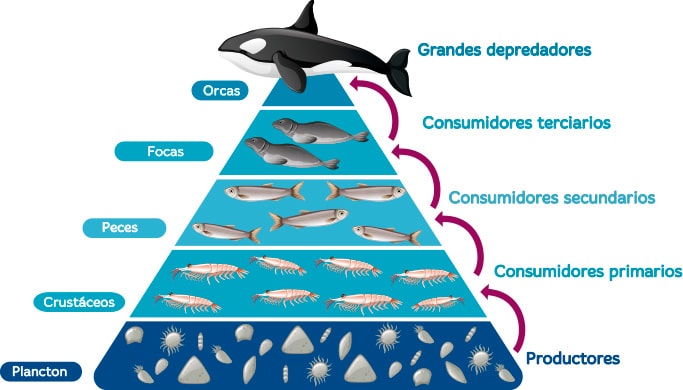
Cadena Alimentaria De Los Biomas De Agua Dulce Los Humedales De