How to Determine Power Consumption of a PC: A Step-by-Step Guide
Understanding your PC's power consumption is crucial for optimizing energy efficiency, reducing electricity costs, and preventing overheating. Whether you're a gamer, a professional, or a budget-conscious user, knowing how to measure your system's power draw can help you make informed decisions. This guide walks you through the tools and methods available to accurately determine your PC's power consumption.
Why Measure Power Consumption?
Power consumption directly impacts your wallet and the environment. A PC left running idly can consume as much as a small refrigerator, while high-performance systems may draw hundreds of watts under load. By monitoring power usage, you can:
- Identify energy-wasting components, such as inefficient power supplies or underutilized hardware.
- Adjust settings to lower consumption without sacrificing performance.
- Prevent overheating, which can shorten hardware lifespan and reduce efficiency.
For example, a gaming PC running at full load might draw 300–500 watts, while a basic office machine could use just 50–100 watts. The difference is significant, especially when considering long-term energy costs.
Tools for Measuring Power Consumption
Several tools can help you track your PC's power draw, ranging from simple hardware solutions to software-based estimates.
1. Kill-A-Watt Meter
A Kill-A-Watt meter is one of the most accurate ways to measure power consumption. This handheld device plugs into a wall outlet and connects to your PC's power supply. It provides real-time watts, volts, and amps, giving you precise data on how much power your system uses in different states—idle, gaming, or rendering.
For instance, a gaming PC might show 250 watts during idle and spike to 450 watts under heavy load. This helps you understand whether your power supply is appropriately sized or if you're wasting energy.
2. Power Supply Unit (PSU) Monitoring
Modern power supplies often include built-in monitoring features. Some PSUs come with LCD displays that show real-time power draw, while others require third-party software to access this data. Tools like EVGA Precision X1 or Corsair Link can provide detailed insights into your PSU's performance and efficiency.
For example, a well-optimized PSU might maintain 85–90% efficiency, while a less efficient one could drop to 70% under load, increasing energy costs.
3. Software-Based Estimates
If you don't want to invest in hardware, software tools like HWMonitor or Open Hardware Monitor can estimate power consumption based on CPU, GPU, and other component loads. While these estimates aren't as precise as a Kill-A-Watt meter, they can still help you identify trends and inefficiencies.
For instance, a software estimate might show that your GPU is consuming 150 watts during gaming, while the CPU uses 60 watts. This can guide you toward optimizing settings or upgrading components.
Steps to Measure Power Consumption
Once you have the right tools, follow these steps to accurately measure your PC's power draw:
- Connect the tool: Plug the Kill-A-Watt meter into the wall and connect it to your PC's power supply. For software-based estimates, install and run the monitoring tool.
- Test different scenarios: Measure power consumption during idle, light tasks (web browsing), and heavy tasks (gaming, rendering).
- Compare results: Look for discrepancies between expected and actual power draw. For example, if your PSU is rated for 650 watts but only draws 300 watts under load, you might be able to downgrade to a smaller, more efficient model.
- Adjust settings: Use the data to optimize your PC—close unnecessary background apps, adjust power plans, or replace inefficient components.
Real-World Example: Optimizing a Gaming PC
Consider a gaming PC with a 750-watt PSU. After testing, you might find that the system only draws 400 watts during idle and 600 watts under load. This reveals that the PSU is oversized, increasing energy costs and heat output. By downgrading to a 500-watt PSU, you can save money and improve efficiency without sacrificing performance.
Alternatively, if your GPU is consistently drawing 200 watts during gaming, you might explore more efficient models or adjust settings to reduce load.
Final Thoughts
Measuring your PC's power consumption is a straightforward way to improve efficiency, cut costs, and extend hardware lifespan. Whether you use a Kill-A-Watt meter, PSU monitoring tools, or software estimates, the key is to test different scenarios and act on the data. Small adjustments—like closing unused programs or upgrading to a more efficient power supply—can make a big difference in both performance and energy savings.
Dave's Volvo Page - Volvo Wiring Harnesses 960 And S90
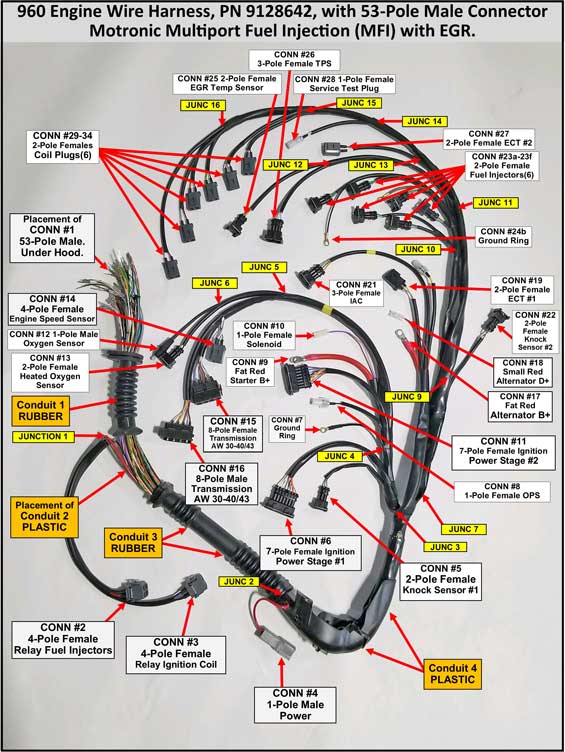
Dave's Volvo Page - Volvo Wiring Harnesses 960 and S90